 crxbase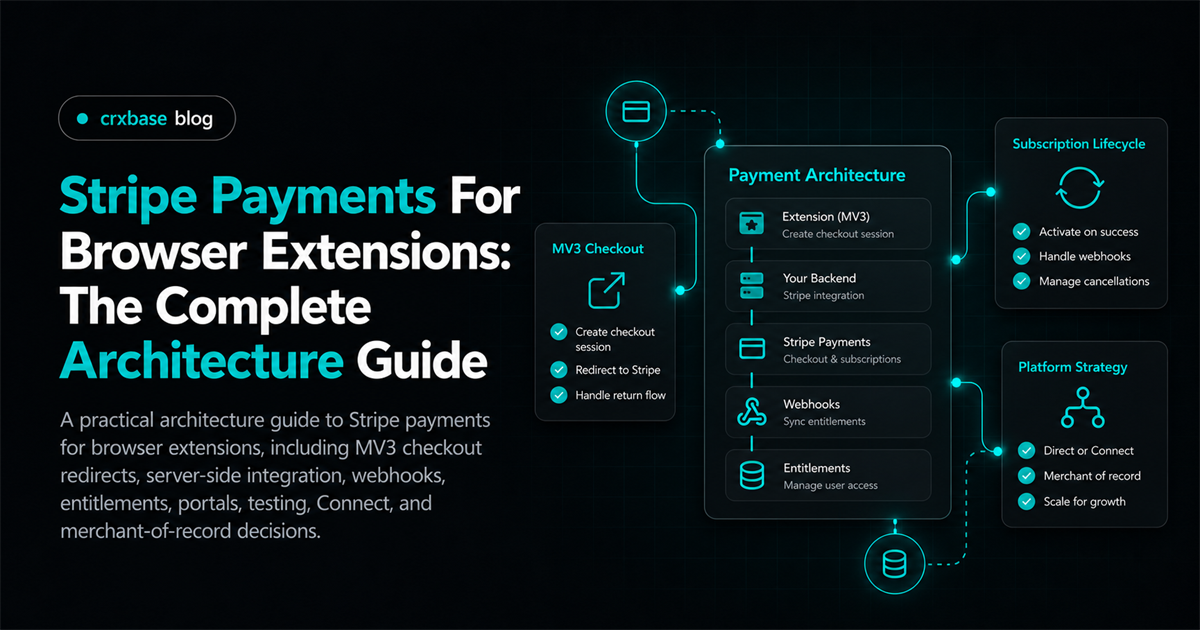
Selling a browser extension is not the same as selling a conventional web app. The extension runs in a constrained client environment, while payment credentials, subscription state, and fulfillment decisions need a trusted server. The clean architecture is therefore a boundary: the extension starts a purchase, Stripe hosts the payment experience, your server receives authoritative payment events, and the extension reads its resulting entitlement from your API.
This separation matters for both security and product reliability. An extension should not contain secret Stripe keys, decide that a payment succeeded because a redirect occurred, or treat a locally stored flag as permanent proof of access. It can provide a good purchase experience, but the server should remain the source of truth.
For the broader browser-extension payment model, see the MV3 Stripe Checkout architecture.
TL;DR
- Keep Stripe secret keys and subscription decisions on your server.
- Use a hosted Stripe Checkout page opened from the extension, then confirm state through webhooks and an authenticated entitlement endpoint.
- Treat the success redirect as a user-experience step, not as payment verification.
- Design customer self-service, duplicate-subscription handling, testing, and account recovery before launch.
- Stripe and a merchant of record solve different operational problems, so choose based on your tax, billing, and support responsibilities.
The reference architecture
A useful system has five parts: the extension UI, an application API, Stripe Checkout, Stripe webhooks, and an entitlement store. The user clicks an upgrade button in the extension. The extension asks your API to create a Checkout Session. Your API validates the user and selected plan, creates the session with Stripe, and returns only the hosted Checkout URL. The extension opens that URL in a browser tab or window.
After payment, Stripe redirects the customer to your configured success or cancel URL. The browser may return to a web page that explains the next step, but that page should not grant access by itself. Stripe also sends events to your webhook endpoint. Your server verifies the event signature, processes relevant event types, and updates an entitlement record. The extension then calls an authenticated endpoint such as GET /api/entitlements and updates its UI.
The Stripe Checkout documentation describes Checkout as a hosted payment page that can handle payment collection and subscription flows. The architecture implication is simple: let the hosted page handle sensitive payment entry, and keep extension code focused on identity, navigation, and product state.
Why MV3 changes the checkout flow
Manifest V3 extensions operate under browser-specific rules for service workers, permissions, content scripts, and extension origins. Those constraints make a remote hosted checkout page a better fit than attempting to embed a full payment form inside extension code. Payment pages may also need capabilities and navigation behavior that do not belong in a content script or popup.
The extension should initiate checkout through a deliberate user action. The background service worker can request a session from your API, then open the returned URL using the browser's tab APIs. Keep the permission surface narrow. An extension generally does not need broad page access merely to open a checkout tab. Review the current Manifest V3 content security policy guidance before adding page or script behavior around the flow.
Your return page can offer a button such as “Return to extension” or tell the user to reopen the extension. If the browser and extension setup support a controlled callback, use a short-lived state value and validate it on the server. Do not place a secret in the callback URL. Also account for users who close the tab, change devices, or finish payment while the extension is not running. Entitlements must be recoverable through login and a fresh API request.
For an implementation focused on the upgrade experience, see the Chrome extension subscription paywall.
Server-side Stripe integration
Your API should own the Stripe integration. At minimum, it needs authenticated user handling, plan validation, Checkout Session creation, webhook processing, an entitlement read endpoint, and customer portal session creation.
When creating a Checkout Session, associate the Stripe customer and your internal account. Useful identifiers can include your internal user ID in metadata and a stable mapping from internal user to Stripe customer. Keep the plan price IDs in server configuration or a database, and accept a plan identifier from the extension only after validating it against an allowlist. Never accept an arbitrary price ID from an untrusted client and pass it through blindly.
For a subscription, create the session in subscription mode and use the appropriate recurring Price. Decide whether the customer must authenticate before checkout or whether you will reconcile a guest checkout by email and later account linking. A stable account identity is usually easier to operate than relying on email matching alone. Email can change, be shared, or be entered differently.
The server should return a small response such as { url }. It should not return secret keys or expose internal Stripe objects unnecessarily. Log request IDs and internal account IDs, but avoid logging card data, full sensitive payloads, or secrets. Stripe's API documentation and Checkout Session API reference are the right places to confirm current parameter names and behavior when implementing.
A language-neutral request flow makes the trust boundary explicit:
extension -> POST /api/billing/checkout { plan: "pro" }
server    -> Stripe Checkout Sessions API with an allowlisted Price ID
server    -> extension { url: "https://checkout.stripe.com/..." }
extension -> opens the URL in a browser tab
Stripe    -> webhook -> server entitlement update -> extension refresh
The extension sends a plan key, not a Stripe Price ID, and the server returns only the hosted URL. That rule prevents the client from choosing arbitrary prices and gives the server one place to enforce account and subscription policy.
Webhook-driven entitlements
Webhooks are the bridge between Stripe's billing state and your application's access state. The webhook endpoint should read the raw request body, verify the Stripe-Signature header with your webhook secret, and reject invalid requests. After verification, process only the event types your product needs.
Common subscription workflows involve events for completed Checkout Sessions, subscription creation or updates, subscription cancellation, and invoice payment outcomes. The exact set depends on whether access is granted at checkout, at the first successful invoice, or under a trial policy. Write the policy down before coding.
Webhook delivery is asynchronous, and events can be retried. Store the Stripe event ID or another idempotency key before applying a state transition, or otherwise make the handler safe to run more than once. Process events in a way that tolerates useful events arriving in an unexpected order. If a later subscription update is already known, an older delivery should not blindly overwrite it.
An entitlement record might contain an internal account ID, Stripe customer ID, Stripe subscription ID, product or plan key, status, current-period end, and timestamps. The extension needs a simple answer, not raw billing complexity. Return capabilities such as pro: true, an access status, and an optional renewal date. Keep the raw Stripe identifiers available for support and reconciliation.
The Stripe webhook guide covers signature verification and event handling concepts. For a focused operational design, see Stripe webhooks for entitlements.
Authentication and entitlement checks
A payment belongs to an account that your server can identify. The extension can use your existing login flow, a browser-based authorization flow, or a short-lived session exchange. Whatever mechanism you choose, bind entitlement reads to the authenticated account on the server. Do not trust a user ID supplied only in a query parameter.
Cache entitlement responses briefly in the extension to keep the UI responsive, but provide a refresh path. A local cache should be treated as a convenience, not an authority. When the user signs out, changes accounts, or receives a billing-related error, clear or revalidate cached state.
Avoid checking subscription status from a content script on every page. A background service worker or shared extension API layer can coordinate checks and expose only the capabilities needed by UI surfaces. This reduces duplicate requests and makes behavior easier to reason about when the service worker is suspended and restarted.
Customer portal and billing self-service
A subscription product needs a safe way for customers to update payment methods, review invoices, change plans where supported, or cancel. Stripe Customer Portal can provide hosted billing self-service without requiring you to build every billing screen.
Create a portal session on your server after verifying the signed-in account and its Stripe customer mapping. Return the short-lived portal URL to the extension, then open it in a browser tab. Configure the allowed portal actions in Stripe and make sure your entitlement webhook logic reflects changes made there.
When a user cancels, decide whether access continues through the current period or ends immediately. Your product copy, server policy, and entitlement status should agree. After a portal action, do not assume the extension knows the result immediately. Refresh entitlement state after a short delay or when the user returns to the extension.
See the Stripe customer portal guide for extension users for the user-flow details.
Preventing duplicate subscriptions
Duplicate billing often starts with an innocent retry: a user clicks twice, a network request times out, or the extension opens checkout again before the first result is known. Prevent it at the application boundary.
Before creating a new subscription Checkout Session, check whether the account already has an active, trialing, or otherwise relevant subscription. Use a server-side idempotency key for requests that may be retried, and record the session associated with the account. Consider a short-lived “checkout in progress” state so repeated clicks can reuse or replace a pending session according to an explicit policy.
Do not use the extension's disabled button as the only protection. Popups can reopen, service workers can restart, and multiple browser contexts can act at once. The server check is the durable control. For a deeper treatment, see duplicate subscription prevention.
Testing the complete payment lifecycle
Test the workflow as a state machine, not only as a successful button click. In development, use Stripe test mode and test payment methods documented by Stripe. Verify session creation, redirects, canceled checkout, successful checkout, webhook signature rejection, duplicate event delivery, delayed webhook processing, subscription updates, failed invoices, cancellation, portal access, and account sign-out.
The extension should behave sensibly when the user closes checkout, loses connectivity, finishes payment on another device, or opens the paywall while an entitlement update is still pending. Test with a fresh browser profile and with an existing signed-in account. Also test service-worker restarts and extension updates, because MV3 lifecycle behavior can expose assumptions that are invisible during a single uninterrupted run.
Use a local webhook forwarding workflow or a deployed test endpoint. Keep test and live webhook secrets separate. Confirm that logs identify the internal account and event ID without revealing sensitive payment details. A small reconciliation tool or admin view can help support staff compare an entitlement record with Stripe, but it should not become a second billing system.
See testing Stripe payments in extensions for a test matrix and practical scenarios.
Stripe Connect and extension platforms
If your product lets other businesses or creators sell through your platform, the architecture changes. Stripe Connect is designed for platform and connected-account relationships, including payment routing and payouts. You must decide who is the merchant-facing party, which account creates the customer and subscription, how application fees work, and who handles disputes, refunds, and support.
Do not add Connect merely because multiple users pay you. A normal SaaS subscription with one business receiving revenue may not need it. Connect becomes relevant when your platform facilitates payments for separate sellers or needs to move funds to them.
Model connected-account identity explicitly. Store the relationship between your internal seller and the Stripe connected account, and define onboarding recovery when a seller abandons or restarts onboarding. Test payment flows for the platform and connected accounts, including failures and account capability changes. Read the current Stripe Connect documentation before selecting charges and transfers or another Connect pattern.
For a platform-specific design, see Stripe Connect for extension platforms.
Stripe versus a merchant of record
Stripe is payment infrastructure and billing tooling. A merchant of record is an operating model in which another provider may take on defined responsibilities around selling, tax handling, payment processing, refunds, and customer-facing transaction operations. The exact responsibilities depend on the provider, product, countries, and contract.
With Stripe, you retain more direct control over checkout, customer data, pricing, subscription logic, and operational policies. You also retain more responsibility for tax registration or collection decisions, compliance, disputes, invoices, support workflows, and regional availability. Stripe's Tax documentation shows why tax handling is a separate product and configuration concern, not an automatic consequence of creating a subscription. A merchant-of-record service may reduce some of that operational burden, but it can introduce fees, product constraints, settlement differences, and a different customer relationship.
Compare the models against your actual sales footprint and team capacity. Ask who is named on receipts, who handles refunds, who answers billing support, how tax is calculated, what happens when a customer disputes a charge, and how you export or migrate customer records. Do not treat “merchant of record” as a universal compliance shortcut. Review the provider's current terms and obtain professional tax or legal advice where the decision has material consequences.
See Stripe versus merchant of record for a decision framework.
A practical launch checklist
Before shipping, confirm that the extension contains no secret Stripe credentials, every server endpoint authenticates and validates input, and price selection is controlled by the server. Confirm that Checkout URLs are generated server-side, return pages do not grant access, webhook signatures are verified, and duplicate event delivery is safe.
Also verify that users can recover access after reinstalling the extension, changing devices, or clearing extension storage. Confirm that portal sessions are created only for the correct customer, cancellation behavior is documented, and support can locate an account using safe identifiers. Separate test and live configuration, monitor webhook failures, and document the manual recovery path for an entitlement that cannot be reconciled automatically.
Conclusion
The durable Stripe architecture for a browser extension is intentionally split. MV3 code starts a hosted checkout and displays product state. Your server owns identity, Stripe API calls, webhook verification, subscription policy, and entitlements. Stripe supplies payment and billing primitives, while your application turns billing state into capabilities the extension can use.
Start with one plan, one account model, one entitlement endpoint, and a small webhook handler that is observable and idempotent. Add customer self-service early. Add Connect only when your business model actually requires connected sellers. Evaluate merchant-of-record services as an operational choice, not as a replacement for clear product and account architecture.