 crxbase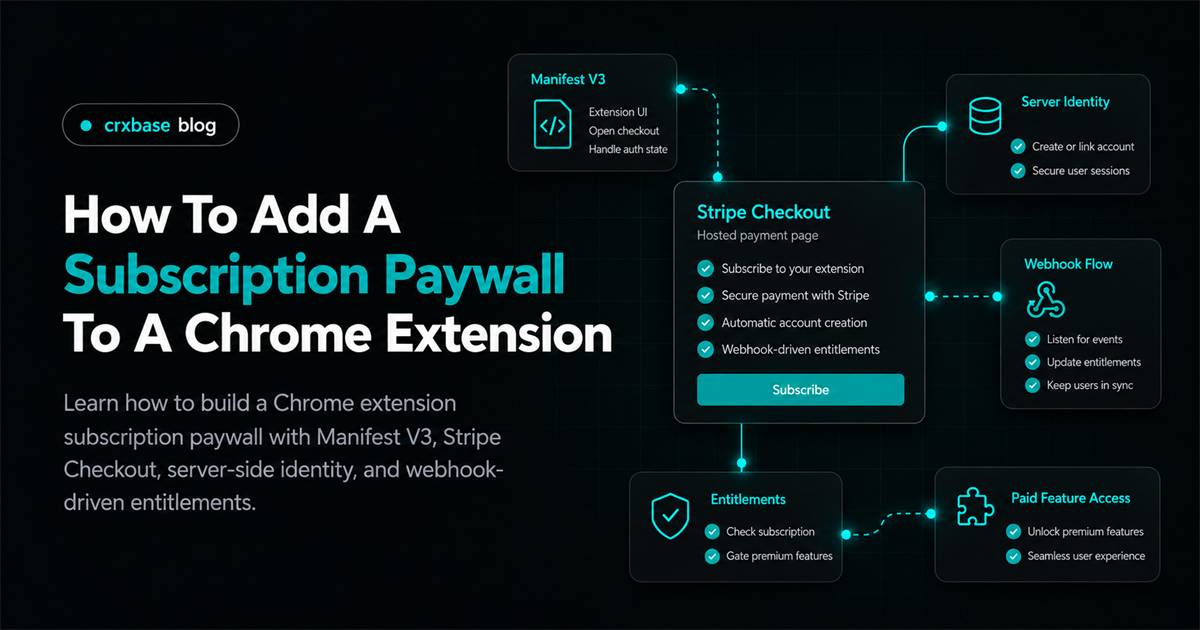
A Chrome extension subscription paywall is a distributed system, not a button that sends someone to a payment page. The extension has a UI and service worker, Stripe owns checkout and billing, and your backend decides which account can use paid features. If those parts do not share one identity and entitlement model, access breaks after checkout, cancellation, trial expiration, or reinstall.
This tutorial shows a practical Manifest V3 design: authenticate the person, create a Checkout Session on your server, open Stripe-hosted checkout in a normal tab, receive Stripe webhook events, and let the extension refresh its entitlement. For the larger architecture, start with the Stripe payments browser extension guide.
TL;DR
- The extension never receives your Stripe secret key. Your server creates Checkout Sessions and handles webhooks.
- Identity comes before payment. Attach Stripe records to an application user, not an extension installation.
- A paywall presents entitlement state. It is not the source of truth.
- Reinstall, trials, cancellation, and payment failure are lifecycle states your API must represent.
The Architecture You Are Building
The flow has one clear responsibility per system:
Extension UI -> your API -> Stripe Checkout Session -> hosted checkout
      ^              ^                  |
      |              |                  v
      +-- entitlement endpoint <- Stripe webhook
The extension asks your API to start checkout. The API authenticates the request, chooses an allowlisted Stripe Price, creates a Session with its secret key, and returns the Session URL. The extension opens that URL with chrome.tabs.create().
After checkout, do not grant access merely because the browser reached a success URL. Stripe sends events asynchronously, and subscription state changes later. Your webhook handler verifies the event, updates your database, and exposes a response such as { "pro": true, "expiresAt": null }.
This separation fits MV3. Manifest V3 packages executable extension code and does not make your server secrets safe to ship. Chrome's manifest reference documents the package structure, while the Stripe Checkout Sessions API documents the server-side checkout object.
For the boundary between hosted checkout and extension code, use why Stripe Checkout does not run directly inside MV3 extensions.
Step 1: Define Identity Before Access
Subscriptions belong to people or organizations in your product, not popups, installs, or local storage. Have the extension sign the user into your application and send your API a credential. Your server verifies it and derives an internal userId.
An illustrative data model might look like this:
users(id, email)
stripe_customers(user_id, customer_id)
subscriptions(user_id, subscription_id, status, price_id, period_end)
entitlements(user_id, feature_key, active, expires_at, updated_at)
The exact schema depends on your database. Enforce uniqueness for a Stripe customer per application user and for each Stripe subscription ID. On every protected request, derive userId server-side. Never accept a userId from the extension body and trust it.
If you use chrome.identity, treat it as part of a deliberate authentication protocol. The identity API can provide OAuth-related information, but your server still verifies tokens and maps them to an application account. An email address alone is not proof of an authorized request.
What just happened: identity became the stable join point between the extension, your database, and Stripe. A reinstall can now recover the same account.
For testing this boundary, use how to test Stripe payments in a browser extension.
Step 2: Model Entitlements, Not Just Paid And Unpaid
A useful paywall needs more states than true and false. Start with a small response that can represent trials, expiration, and management:
// Illustrative response from GET /api/entitlements.
{
  accountId: "user_123",
  plan: "pro",
  status: "trialing",
  features: { export: true, automation: true },
  expiresAt: "2026-10-01T00:00:00.000Z",
  manageUrl: "https://example.com/account/billing"
}
Stripe subscription statuses include states such as trialing, active, past_due, canceled, and incomplete. Translate them into your product policy in one server function. You might allow a grace period for past_due, while canceled remains active until the paid period ends.
export function canUseFeature(entitlements, feature) {
	return entitlements?.features?.[feature] === true;
}
The extension can use this function to render a lock, but your server must repeat the check for paid exports, jobs, synchronization, or other valuable operations. Users can edit extension storage and call APIs outside the extension.
Cache the last successful response for fast popup rendering, with an account ID and timestamp. Clear it on sign-out. Refresh when the popup opens and after returning from checkout. A cache improves responsiveness; it must not become permanent authorization.
Step 3: Create Checkout Sessions On Your Server
Accept a plan key from the extension, not an arbitrary Price ID. Map that key to a configured Price on the server. This keeps pricing decisions outside client-controlled code.
import Stripe from "stripe";
const stripe = new Stripe(process.env.STRIPE_SECRET_KEY);
const prices = { pro_monthly: process.env.STRIPE_PRO_MONTHLY_PRICE_ID };

export async function createCheckoutSession(req, res) {
	const user = await requireUser(req); // Verified authentication middleware.
	const priceId = prices[req.body.plan];
	if (!priceId) return res.status(400).json({ error: "Unknown plan" });

	const customerId = await getOrCreateStripeCustomer(user);
	const session = await stripe.checkout.sessions.create({
		mode: "subscription",
		customer: customerId,
		line_items: [{ price: priceId, quantity: 1 }],
		success_url: "https://example.com/billing/success?session_id={CHECKOUT_SESSION_ID}",
		cancel_url: "https://example.com/billing/canceled",
		client_reference_id: user.id,
		metadata: { userId: user.id },
		subscription_data: { metadata: { userId: user.id } },
	});
	return res.json({ url: session.url });
}
This is illustrative, not production code. Add authentication, validation, logging that excludes secrets, and framework-specific error handling. Make the route safe against repeated clicks and network retries. Before creating a new customer or subscription, look up an existing active, trialing, or incomplete record for the same user and plan.
The success URL is a landing page, not an entitlement grant. It can say “Payment received. We are confirming your subscription,” then trigger a bounded refresh. If the webhook has not arrived, show a retry action.
For duplicate attempts, use how to prevent duplicate subscriptions in extensions.
Step 4: Open Hosted Checkout From MV3
The extension only requests a URL and opens it. Start from a user gesture so the intent is clear:
async function startSubscription(plan) {
	const token = await getAppAccessToken();
	const response = await fetch("https://api.example.com/billing/checkout", {
		method: "POST",
		headers: { "Content-Type": "application/json", Authorization: `Bearer ${token}` },
		body: JSON.stringify({ plan }),
	});
	if (!response.ok) throw new Error("Could not start checkout");
	const { url } = await response.json();
	await chrome.tabs.create({ url });
}
Configure only the extension permissions and API hosts you need. Opening a normal browser tab is usually easier to reason about than making a payment page part of an extension-owned page.
After checkout, a hosted success page can ask the user to reopen the extension or offer a verified return path. Do not put secrets in query strings, and do not treat a client-supplied session_id as proof of ownership. If you reconcile a Session, retrieve it on the server and confirm that it belongs to the authenticated user.
Step 5: Convert Webhooks Into Entitlements
Webhook processing is where billing events become product state. Verify the signature using the raw request body, make handling idempotent, and tolerate redelivery and out-of-order events. Stripe's subscription webhook guide describes events for subscription changes, payment failures, trials, and active entitlements.
export async function stripeWebhook(req, res) {
	let event;
	try {
		event = stripe.webhooks.constructEvent(req.rawBody, req.headers["stripe-signature"], process.env.STRIPE_WEBHOOK_SECRET);
	} catch {
		return res.status(400).send("Invalid webhook signature");
	}

	if (await alreadyProcessed(event.id)) return res.json({ received: true });
	switch (event.type) {
		case "customer.subscription.created":
		case "customer.subscription.updated":
		case "customer.subscription.deleted":
			await syncSubscription(event.data.object);
			break;
		case "invoice.payment_failed":
			await markPaymentProblem(event.data.object);
			break;
	}
	await recordProcessed(event.id);
	return res.json({ received: true });
}
Your framework must preserve the raw body. Your database update should be transactional, and the entitlement should be derived from the latest known billing state rather than incremented for every event. The browser may be closed when a renewal fails, so server-side webhook processing is essential.
For the full event-to-access design, use how to handle Stripe webhooks for extension entitlements.
Step 6: Build The Paywall UI Around State
Explain value before asking for payment. Tell users what is locked, what the free plan includes, the price and interval, and how to manage or cancel.
function renderExportButton(entitlements) {
	const button = document.querySelector("#export");
	const paywall = document.querySelector("#export-paywall");
	const paid = canUseFeature(entitlements, "export");
	button.hidden = !paid;
	paywall.hidden = paid;
	if (!paid) paywall.querySelector("[data-plan]").textContent = "Pro export";
}
Do not hide every useful action behind a full-screen gate when a locked control can explain the upgrade. Use an accessible label, keyboard-accessible upgrade action, visible focus state, and readable status text.
For an active trial, show its end date and what happens next. For cancellation, distinguish “will end at period end” from “ended now.” For past_due, explain that payment needs attention and link to billing management. A subscription management page is often better than recreating card and cancellation UI inside the extension. Use Stripe customer portal for extension users for that next flow.
Trial, Cancellation, And Reinstall Behavior
Treat lifecycle behavior as part of the first extension paywall implementation.
Free trials
Create trial policy in Stripe and mirror the resulting state in your entitlement record. Do not calculate trial duration from install date. Return expiresAt from your API and let webhook processing update access when the trial converts, pauses, or ends.
Cancellation
Cancellation commonly means “do not renew,” while access continues through an effective end date. Model that date explicitly. When the period ends, the server changes the feature map and the extension shows the upgrade UI on its next refresh.
Reinstall and new devices
An extension reinstall can clear local storage, but it must not clear server billing state. After sign-in, call GET /api/entitlements, replace the snapshot, and render the account's current access. A new device should use the same recovery path.
Test The Complete Flow
Test the state machine, not only the checkout button:
- Signed-out users cannot call protected APIs.
- A free user receives a server-created Checkout URL.
- Repeated clicks do not create duplicate customers or subscriptions.
- Access changes after a webhook or verified server reconciliation, not merely a success redirect.
- Trial expiration, cancellation, payment failure, and restoration produce the intended states.
- Clearing extension storage and reinstalling restores access after sign-in.
- Editing local storage or changing an account ID does not grant access.
Use Stripe's test environment and webhook testing tools, then inspect your own database after each transition. Keep an event log with event ID, type, processing result, and timestamps, without storing payment secrets. For a deeper plan, use testing Stripe payments in a browser extension.
Troubleshooting
Checkout opens, but access remains locked
Check webhook delivery, signature verification, user mapping, and database updates. Add a bounded refresh action for webhook timing delays.
Reinstall creates a new customer
Billing is keyed to installation state. Look up the Stripe customer through the authenticated application user and enforce uniqueness.
Local storage unlocks a feature
The server trusts a client flag. Treat local state as UI cache and enforce entitlements again on every paid backend operation.
Double clicks create subscriptions
Disable the button while pending, but also make the server idempotent and reconcile an existing active or incomplete subscription.
Production webhooks fail
Check raw-body handling, endpoint secret, event logging, and idempotent database updates. Never log card data or secret values while debugging.
Frequently Asked Questions
Should a Chrome extension store subscription status locally?
It may cache a snapshot for quick rendering, but the server remains authoritative. Include the account ID and freshness timestamp, and refresh it regularly.
Can the extension call Stripe's secret-key API?
No. Secret-key calls belong on your server. The extension requests a hosted Checkout Session and opens the returned URL.
Does cancellation immediately remove paid features?
Not necessarily. Your policy may allow access until the current period ends. Expose the effective end date so the UI is clear.
How do I support multiple plans?
Send a stable plan key, map it to an allowlisted Price ID on the server, and store the selected price with the subscription.
Next Steps
You now have the minimum architecture for Chrome extension paid features: one application identity, a server-created subscription Checkout Session, hosted checkout, webhook-driven state, and UI that reflects entitlements. Keep the first release narrow. Protect one valuable feature, make recovery obvious, and observe every transition before adding more plans.
Resolve the related zones for webhook entitlement synchronization, subscription management after checkout, and duplicate-subscription prevention. Then revisit the Stripe payments browser extension guide.