 crxbase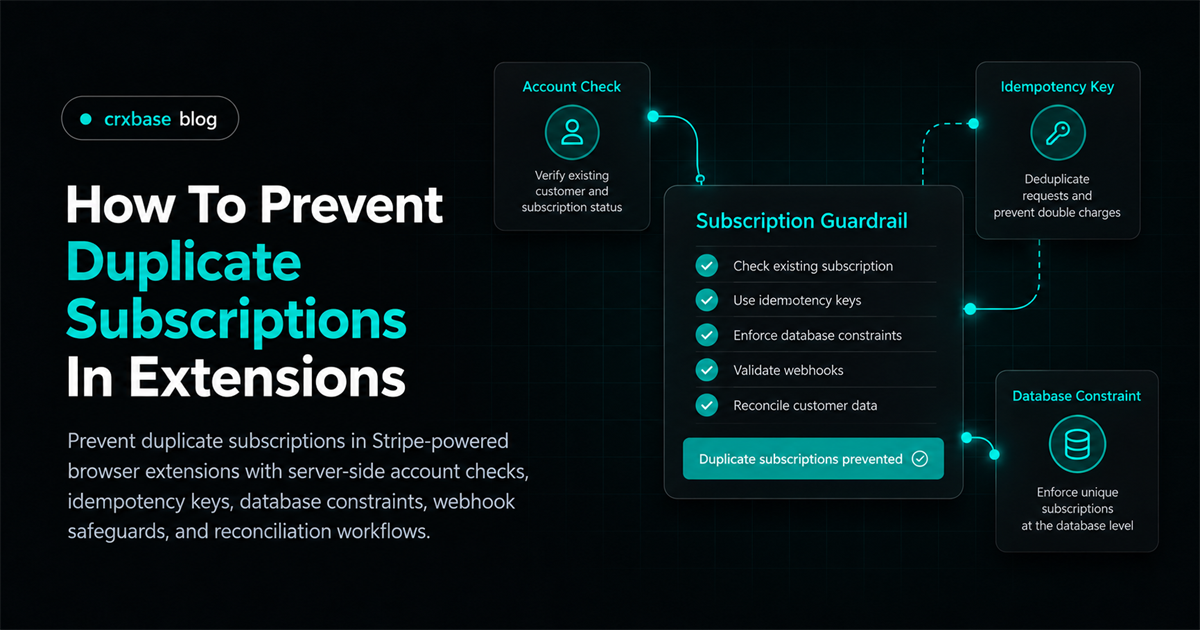
Duplicate subscriptions are usually an application race. A user clicks twice, opens checkout in two tabs, resumes an old Session, or retries after a timeout. If every request blindly creates a new Checkout Session, the backend can create multiple subscriptions for the same person.
The reliable way to prevent duplicate subscriptions in Stripe-powered browser extensions is to enforce one billing owner and one active-subscription policy on the server. Add an account check before checkout, make the create request retry-safe with an idempotency key, record checkout state, and enforce the final invariant with a database constraint. Then make webhooks idempotent and order-tolerant so your entitlement state remains correct after retries.
This guide assumes you already have a backend, authenticated extension users, and a Stripe subscription flow. For the broader architecture, start with the Stripe payments browser extension guide. For the webhook side of entitlement updates, see Stripe webhook entitlement handling.
TL;DR
- Treat your application account, not an email address or extension install, as the billing identity.
- Check for an existing active or incomplete subscription before creating Checkout, but do not rely on that check alone.
- Use a stable idempotency key for one checkout intent and a unique database constraint for the final single-subscription rule.
- Process Stripe events once, tolerate retries and out-of-order delivery, and reconcile uncertain records from Stripe.
- Cancellation should change state deliberately. It should not silently create a second subscription during a restart.
Before You Begin
You will need:
- A server-side Stripe secret key and a recurring Price.
- An authenticated application account ID for every extension user.
- A database with transactions and unique constraints.
- A webhook endpoint that verifies Stripe signatures.
- A policy that defines which statuses block a new subscription.
This is an intermediate guide. The code is illustrative pseudo-code, not a drop-in SDK sample. Check Stripe's Checkout Session API reference against your SDK and API version.
Step 1: Make the Application Account the Billing Identity
By the end of this step, every authenticated user will map to exactly one Stripe Customer in your system. This prevents the same person from creating separate billing records merely because they used another email, browser profile, or extension installation.
Stripe Checkout can create a Customer when you omit one in subscription mode. That default is convenient, but it is risky for a product that needs a single active subscription per application account. Pass the existing Customer ID for the account instead. Stripe documents that a Checkout Session can reference a Customer, and that the Session contains the resulting Subscription after successful payment (Create a Checkout Session).
- Create a
billing_customerrow when the application account first enters billing. - Store the Stripe Customer ID in that row, with a unique constraint.
- On every billing request, derive the account from the authenticated session. Never accept
customer_idas authoritative input from the extension. - If the account has no Customer yet, create one in a transaction or through a small, separately idempotent provisioning operation.
Illustrative schema:
create table billing_customer (
  account_id uuid primary key references account(id),
  stripe_customer_id text not null unique,
  created_at timestamptz not null default now()
);
Use a stable application account ID in Stripe metadata as well. Metadata helps reconciliation, but is not an identity check.
const customer = await stripe.customers.create(
	{
		metadata: { account_id: account.id },
	},
	{ idempotencyKey: `customer:${account.id}` },
);
Verification: retrieve the account from your backend and confirm that it always returns the same Customer ID, regardless of which extension installation or tab made the request.
Step 2: Check Subscription State Before Starting Checkout
By the end of this step, a second subscribe request will return the existing billing state instead of opening a new purchase flow. This is the user-facing guardrail, but it is only the first layer because two requests can pass the check at the same time.
Define your policy before writing code. A common policy blocks a new subscription when the account has one in active, trialing, past_due, or incomplete status. Whether past_due blocks a purchase depends on your dunning policy. incomplete matters because first-payment authentication may still be unfinished.
Query your own subscription table first. It is faster, works during a Stripe API outage, and gives you a consistent account-level view. Then use Stripe retrieval when the local record is missing, stale, or ambiguous.
const existing = await db.subscription.findBlockingForAccount(account.id);

if (existing) {
	return {
		action: existing.status === "incomplete" ? "resume_checkout" : "manage_billing",
		subscriptionId: existing.stripeSubscriptionId,
	};
}
Do not use extension local storage as this check. A user can have several installations, and local state can be deleted or stale. For customer-managed billing, link users to the Stripe customer portal for extension users.
Verification: test an account with an active subscription, a trialing subscription, an incomplete first payment, and no subscription. Each case should produce the intended action without creating a Checkout Session unnecessarily.
Step 3: Record Checkout-in-Progress State
By the end of this step, repeated clicks during an unfinished checkout will reuse or return the same pending attempt. This closes the gap between the pre-check and the eventual subscription webhook.
Create an application checkout attempt before calling Stripe. Give it a stable key based on the account and purchase intent. Never generate a fresh random key for an HTTP retry.
create table checkout_attempt (
  id uuid primary key,
  account_id uuid not null references account(id),
  intent_key text not null unique,
  stripe_checkout_session_id text unique,
  status text not null check (status in ('creating', 'open', 'complete', 'expired', 'failed')),
  created_at timestamptz not null default now(),
  updated_at timestamptz not null default now()
);

create unique index one_open_checkout_per_account
  on checkout_attempt (account_id)
  where status in ('creating', 'open');
Within a transaction, insert the attempt. If the unique index reports a conflict, return the existing attempt. After the insert succeeds, create Checkout with the application account's Customer ID and the attempt ID in client_reference_id or metadata.
const intentKey = `subscription:${account.id}:${requestedPlan}`;
const attempt = await db.checkoutAttempt.insertOrGet({
	accountId: account.id,
	intentKey,
	status: "creating",
});

if (attempt.stripeCheckoutSessionId) return attempt;

const session = await stripe.checkout.sessions.create(
	{
		mode: "subscription",
		customer: billingCustomer.stripeCustomerId,
		client_reference_id: attempt.id,
		line_items: [{ price: requestedPlan, quantity: 1 }],
		success_url: `${APP_URL}/billing/success?session_id={CHECKOUT_SESSION_ID}`,
		cancel_url: `${APP_URL}/billing/cancel`,
	},
	{ idempotencyKey: `checkout:${attempt.intentKey}` },
);
Persist the Session ID immediately. If the call succeeds but the response times out, the next request can find the saved Session or safely repeat the same request with the same key. If the result is unknown, reconcile before starting another attempt.
Verification: click the button repeatedly and send the same request from two tabs. Both requests should resolve to one application attempt and one Checkout Session.
Step 4: Enforce One Active Subscription in the Database
By the end of this step, concurrent webhook handlers cannot commit two active subscriptions for one account. Application checks are necessary for a friendly response, but only an atomic database rule can close the race between two workers.
Keep the Stripe subscription ID unique globally, and enforce the product invariant locally. A PostgreSQL example is:
create table subscription (
  id uuid primary key,
  account_id uuid not null references account(id),
  stripe_subscription_id text not null unique,
  status text not null,
  current_period_end timestamptz,
  cancel_at_period_end boolean not null default false,
  updated_at timestamptz not null default now()
);

create unique index one_blocking_subscription_per_account
  on subscription (account_id)
  where status in ('active', 'trialing', 'past_due', 'incomplete');
The exact statuses are a business decision. The database predicate must match the server policy.
When a webhook tries to insert a second blocking subscription, catch the uniqueness violation inside a transaction. Do not grant access to both records. Mark the second record as duplicate_review or store it in a reconciliation queue with the event ID and Stripe IDs. Support can then decide whether to cancel, refund, or preserve a subscription according to your documented policy.
This constraint also protects against concurrent clicks, delayed delivery, queue duplication, and event replay.
Verification: run two transactions that try to insert blocking subscriptions for the same account. One commits and one fails. Your handler must turn the failure into a safe reconciliation outcome, not a 500 loop that causes endless webhook retries.
Step 5: Make Stripe Requests and Webhooks Idempotent
By the end of this step, retries will not create new checkout work or apply the same event twice. Stripe recommends idempotency keys for safely retrying requests, and its subscription documentation explains that webhook events are the mechanism for asynchronous subscription activity (Using webhooks with subscriptions).
Use an idempotency key that represents the same logical operation. For a subscription purchase, the key can include the account and a checkout intent ID. Do not include a timestamp, random UUID, or browser tab ID if those values change during retry.
Webhook idempotency is separate. Store each received Stripe event before applying its business effect:
create table stripe_event (
  stripe_event_id text primary key,
  event_type text not null,
  payload jsonb not null,
  received_at timestamptz not null default now(),
  processed_at timestamptz
);
Illustrative handler:
await db.transaction(async (tx) => {
	const inserted = await tx.stripeEvent.insertIfAbsent({
		stripeEventId: event.id,
		eventType: event.type,
		payload: event,
	});

	if (!inserted) return; // duplicate delivery

	await applySubscriptionEvent(tx, event);
	await tx.stripeEvent.markProcessed(event.id);
});
Verify the webhook signature against the raw request body before parsing it. Return a successful response only after the event is durably recorded, or use a durable queue whose enqueue operation is part of your delivery contract.
Verification: deliver the same event twice and confirm that the event table has one row and the subscription or entitlement transition happens once.
Step 6: Handle Event Ordering, Retries, and State Transitions
By the end of this step, an older event cannot blindly overwrite a newer subscription state. Stripe says not to assume webhook delivery order. Your system should treat events as notifications to evaluate state, not as a perfectly ordered command stream.
For each event, identify the application account from trusted stored mappings and the Stripe object ID. Compare the event's object state with the local row. If the event is ambiguous, retrieve the current Subscription from Stripe and apply the latest known state. Store an observed event ID and an updated timestamp or version so an old retry cannot roll a row backward.
await db.transaction(async (tx) => {
	const current = await tx.subscription.getByStripeId(subscription.id);

	if (current && eventCreatedAt < current.lastEventCreatedAt) {
		return; // older notification; retain current state
	}

	await tx.subscription.upsert({
		accountId,
		stripeSubscriptionId: subscription.id,
		status: subscription.status,
		currentPeriodEnd: fromUnix(subscription.current_period_end),
		lastEventCreatedAt: eventCreatedAt,
	});
	await tx.entitlement.recomputeForAccount(accountId);
});
The timestamp comparison is illustrative. Let your database isolation and event fields determine the final implementation. Retrieving the current Stripe object when a transition looks contradictory is often safer than building a complex ordering engine.
Retries also affect the HTTP response path. A successful Session creation can be followed by a timeout. Return the stored Session when the intent key exists. Do not make the browser decide that a timeout makes a new subscription safe.
Verification: replay events in reverse order, inject a transient database failure, and retry the same API request. The final entitlement should match the latest subscription state, and the retry should not create another subscription.
Step 7: Define Cancellation and Restart Behavior
By the end of this step, cancellation, expiration, and resubscribe actions will have explicit transitions instead of accidentally opening duplicate billing records.
Distinguish these cases:
- A user cancels at period end. Keep the subscription as the single current record while access remains valid. A restart can update that subscription when Stripe supports the operation and your policy allows it.
- A subscription is fully ended. Mark it ended only after the authoritative Stripe state or webhook confirms the end. A new checkout can then create a new subscription.
- Checkout expires without a subscription. Mark the attempt expired and allow a fresh attempt, using a new intent key.
- The first invoice is incomplete. Offer resume or payment completion, not a second checkout.
- A payment fails. Follow your dunning policy. Do not silently grant access because a new checkout was clicked.
Keep cancellation and restart idempotent. A repeated cancel should produce the same state. A restart should re-read the subscription and verify eligibility.
If you support a “switch plan” action, model it as an update to the existing subscription where possible. Creating a second subscription and canceling the first later creates a period in which both can bill, and it makes entitlement ordering harder.
Verification: test cancel-at-period-end, immediate cancellation, expired checkout, failed payment, and resubscribe after a fully ended subscription. Record the expected billing and access result for each case.
Common Mistakes To Avoid
Only disabling the extension button. A disabled button does not stop two already-issued requests, another tab, or a retry. Keep the UI guard, but enforce the rule on the server and in the database.
Using email as the uniqueness key. Emails can change, differ in case, or belong to more than one application account. Use your authenticated account ID and map it to one Stripe Customer.
Creating a new random idempotency key on every retry. That tells Stripe each retry is a new operation. Derive the key from a durable checkout intent.
Granting access from the success page. A redirect is useful for UX, but webhooks and authenticated entitlement reads should establish the durable state. The Stripe webhook entitlement handling flow covers that separation.
Assuming one event means one state transition. Delivery can be retried and events can arrive out of order. Deduplicate by event ID, compare state, and reconcile when necessary.
Results: What Success Looks Like
If the design is working, one application account has one Stripe Customer, at most one blocking subscription, and at most one open checkout attempt. Repeated clicks return the existing attempt or billing state. A timeout can be retried without creating a second Checkout Session. Replayed webhooks do not duplicate rows or entitlement changes, and an older event cannot overwrite a newer state.
The final check is operational: support can search by account ID, Stripe Customer ID, Subscription ID, Checkout Session ID, and event ID. When those identifiers are connected, an ambiguous case becomes a short reconciliation task instead of guesswork. For a practical test plan, use testing Stripe payments in a browser extension. If your business model may change who is responsible for billing, compare Stripe versus merchant of record.
Support Reconciliation For Existing Duplicates
Guardrails prevent new duplicates, but existing data may be inconsistent. Build a read-only report grouped by account and Stripe Customer ID. Include status, creation time, period end, cancellation flags, Session ID, and event ID.
select account_id, count(*) as subscription_count,
       array_agg(stripe_subscription_id order by created_at) as stripe_ids
from subscription
where status in ('active', 'trialing', 'past_due', 'incomplete')
group by account_id
having count(*) > 1;
Do not cancel a row solely because it looks duplicated. Confirm payment history, user intent, and policy. Record the decision, operator, Stripe action, and resulting webhook, then add a regression test.
Conclusion
To prevent duplicate subscriptions in extensions, make the server own identity and subscription state, reuse one Stripe Customer, protect checkout with a durable intent and idempotency key, and let a database constraint enforce the single active subscription rule. Webhook deduplication, order-tolerant updates, explicit cancellation behavior, and support reconciliation complete the system. Once these guardrails are in place, the extension only needs to request and display the backend's current entitlement state.